
Quick Verdict
If you live in spreadsheets, long docs, timelines, or big canvases, the MX Master 3S is built for you.
If you want something light, travel-friendly, or mostly for gaming, you’ll probably be happier with a smaller or more gaming-focused mouse.
The top features are Quiet Clicks, MagSpeed adaptive scrolling, a Darkfield sensor that can track on glass, and deep customization through Logi Options+.
Disclosure
I purchased this mouse out of pocket for my home office from Amazon at this link: https://www.amazon.com/Logitech-Master-Bluetooth-Wireless-Receiver/dp/B09HM94VDS/
What it is
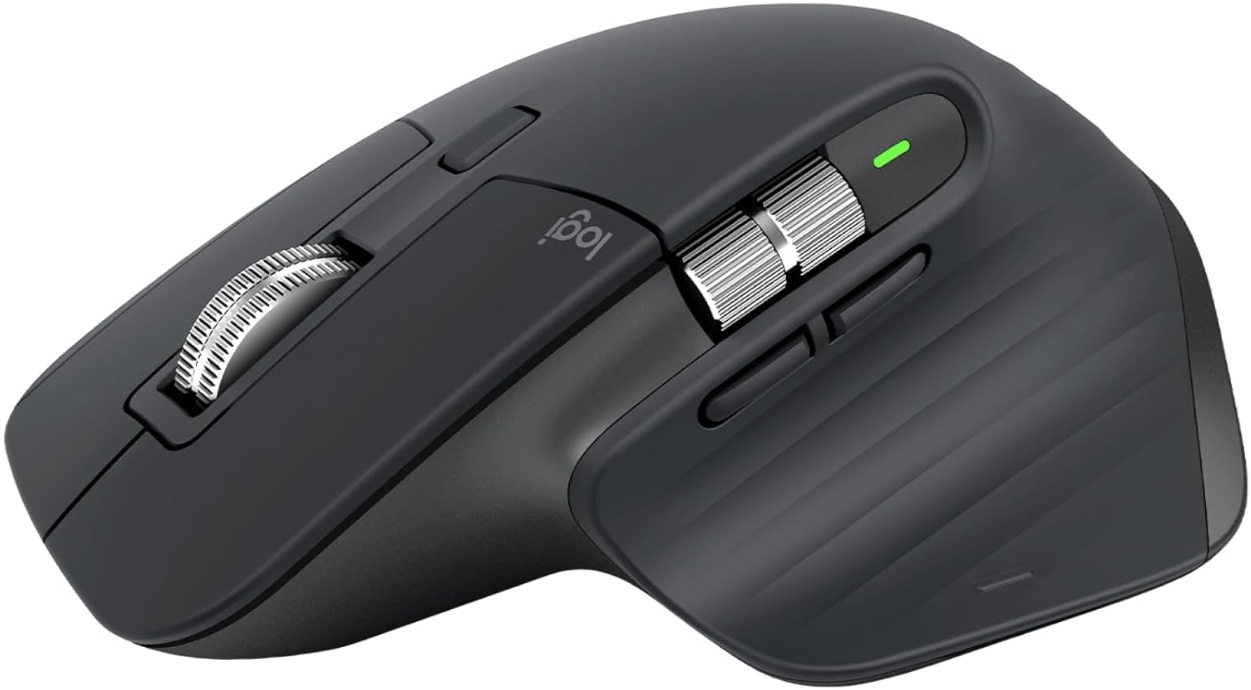
The Logitech MX Master 3S is a premium wireless productivity mouse with a high-DPI Darkfield sensor (including “track-on-glass”), MagSpeed scrolling, and multiple customizable buttons/wheels aimed at faster work in apps like browsers, Office, and creative tools.
How I tested / used it
I use this mouse daily, and it works great. No drifting or jittering, and the clicks are very quiet. The larger size was a surprise, but now I find it quite comfortable. The app also makes it easy to program the various buttons, and I love that it lets you know how much battery charge is left.
Key specs
- Sensor: Darkfield high precision
- DPI range: 200–8,000 DPI (nominal 1,000 DPI)
- Connection: Logi Bolt + Bluetooth Low Energy
- Buttons: 7 customizable buttons
- Scroll wheels: MagSpeed main wheel + thumb wheel
- Weight: 141 g
- Battery: up to 70 days (usage-dependent) + quick charge support
Pros
- Excellent “work mouse” feature set: MagSpeed wheel + thumb wheel + gesture/button customization
- Tracks up to 8,000 DPI and is marketed to work on glass
- Multiple connection options: Logi Bolt receiver + Bluetooth Low Energy
- Can pair with up to three computers (Easy-Switch)
- Long rated battery life (up to 70 days, usage-dependent) and quick-charge support
- Strong cross-platform device support list (Windows, macOS, iPadOS, Linux, ChromeOS, Android listed in specs)
Cons
- It’s relatively heavy at 141 g (great for stability; not great if you want an ultralight feel)
- To unlock the full customization/Flow experience, you’ll want Logi Options+ (listed for Windows and macOS), which matters if you primarily use Linux/iPadOS
- Packaging/variants can be confusing: “Standard Edition” includes the Logi Bolt receiver and a USB-A to USB-C charging cable, while “Bluetooth Edition” does not
- No official left-handed MX Master 3S model is marketed; left-handed users often look elsewhere (or even resort to DIY mods)
Who should buy it
- You work in long documents, spreadsheets, or creative apps and want fast scrolling + horizontal control
- You switch between multiple computers/devices and want Easy-Switch (and potentially Flow)
- You want a premium productivity mouse with lots of customization options
Who shouldn’t
- You want a small, travel-first mouse (look at compact options instead)
- You want a “pure gaming” mouse feel (ultralight, esports-focused shape, etc.)
- You’re on Linux/iPadOS and want the same deep customization you’d get on Windows/macOS
Bottom line
The MX Master 3S is one of my favorite “buy it for work” mice: it’s built around fast scrolling, horizontal control, and multi-device workflows.
Before you hit checkout, ensure you select the edition you actually want (receiver included vs. Bluetooth-only), and plan to install Logi Options+ for full customization and Flow features.